
Deadlines that slip
Inspection schedules in spreadsheets, reports buried in inboxes: an overdue inspection often surfaces the day before the fire safety visit.
Group Technical Director
Regulatory inspections, findings, work orders, audits and equipment for every property, in one platform. You know what is overdue, where, and for how long.
What slows you down
Inspection schedules in spreadsheets, reports buried in inboxes: an overdue inspection often surfaces the day before the fire safety visit.
Inspectors' observations stay in PDFs. Nobody knows which ones have been addressed.
The same leak, in the same room, three times a year: without history, recurring issues go unnoticed.
Scribbled notes, lost photos, reports typed up at night: recommendations get lost between two visits.
What you gain
Set up maintenance groups and inspection types once; every property inherits them. Last inspection plus frequency gives the next due date, and color coding flags every delay. The equipment inventory costs upcoming renewals.
Explore the module Corrective maintenanceAnalytics view and statistics by property, area or equipment: repeated breakdowns steer your preventive plans and your investments.
Explore the module Internal auditsThe group's audit template on your phone, even with no signal. Photos and voice notes, transcribed and summarized by AI, then a PDF report sent to the right people in one click.
Explore the module CAPEXWhen technical approval is requested on a CAPEX request, it cannot be accepted without your sign-off.
Explore the module Suppliers & procurementEach inspection can be linked to its contract: you know which supplier is due on site, and a maintenance contract's notice date no longer slips by.
Explore the moduleA day with GET17
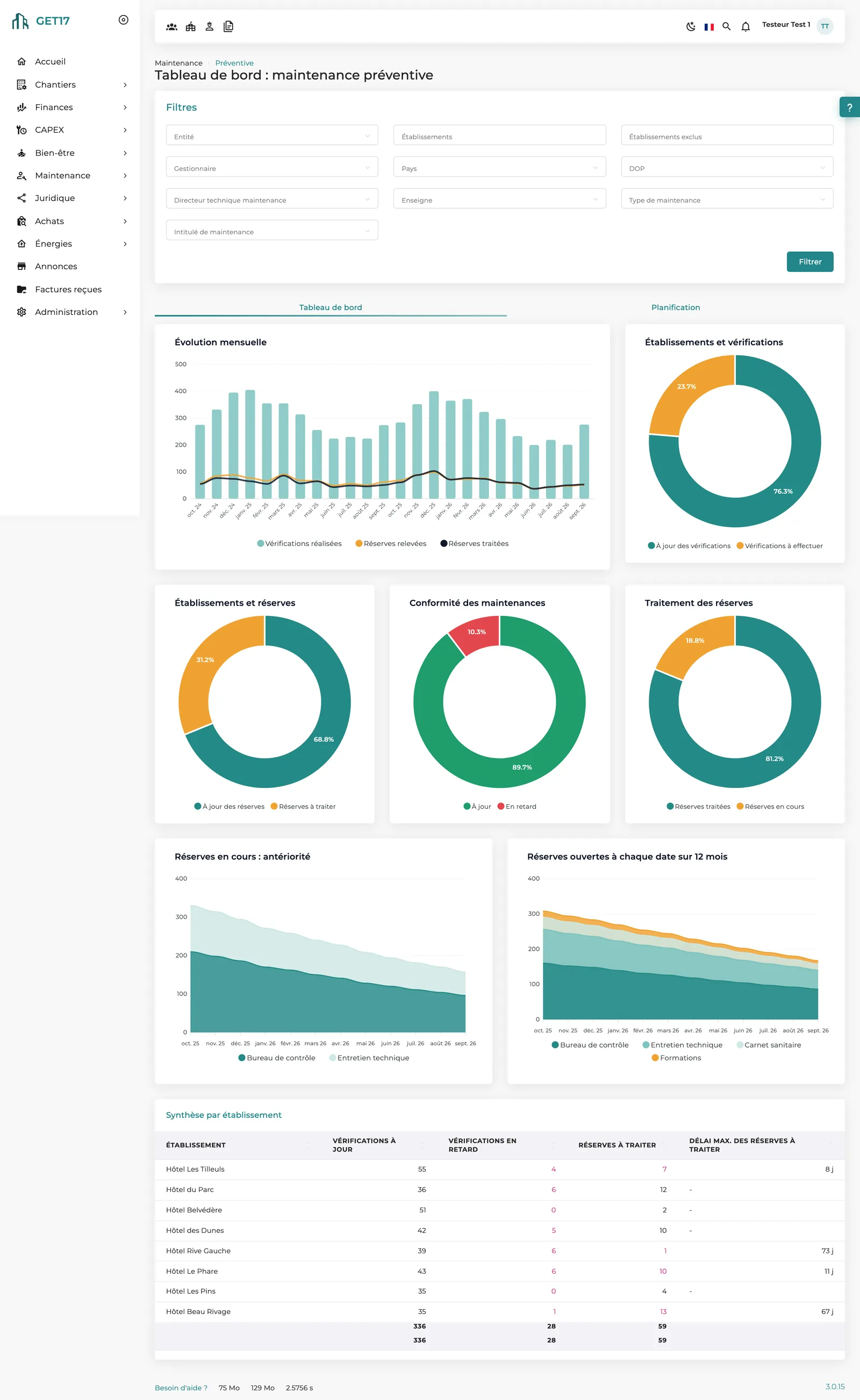
The preventive dashboard shows, for each property, inspections up to date, overdue, and findings to address. One click on a row opens the site's details.
The audit is downloaded to your phone before you head down to the boiler room. Offline, you check each item, photograph a dead emergency light and record a voice note.
One tap on the cloud icon syncs the audit: statuses, photos and voice notes reach the platform, where the notes can be transcribed and summarized by AI.
A CAPEX request to replace a heat pump awaits your opinion. With comparative quotes and photos at hand, you approve it or send it back for rework with a comment.
Close and distribute: the PDF report is emailed to the property's general manager, the operations director and audit followers. Recommendations stay tracked until they are resolved.
Your dashboard
Monthly trends of inspections and findings, maintenance compliance, finding resolution and a per-property summary: portfolio compliance on a single screen.
Frequently asked questions
Reminders appear as tasks on the home page: inspections due, overdue inspections, findings to address. Each one opens the exact screen where you can act.
Yes. Inspection types are inherited from the maintenance group; an inspection can be marked as not applicable for a property, or given its own frequency.
Yes. Once downloaded, an audit can be completed offline (statuses, comments, recommendations, photos, voice notes), then synced when you are back online.
No. The approach is qualitative: each item is checked, not checked or not applicable, with comments and recommendations tracked until they are resolved.
See how GET17 brings inspections, findings, work orders and audits for all your properties into one platform.