

A budget that falls behind
The budget sits in a spreadsheet, the orders in emails: actual commitments have to be rebuilt before every meeting.
Projects Director, Construction Project Manager
Budget by category, orders, approvals, invoices, retentions, schedule: every project has its complete file. Amounts are posted in real time and every decision stays on record.
What slows you down
The budget sits in a spreadsheet, the orders in emails: actual commitments have to be rebuilt before every meeting.
Internal approvals, signatures, reminders: a selected quote takes days to become an order that actually goes out.
Expired certificate, missing insurance: compliance documents get chased at the last minute.
Everyone works from their own schedule. Nobody knows which one is current or who has been told.
What you gain
Quote pre-filled by OCR where enabled, purchase order generated as a PDF, financial approval, up to three management levels, e-signature, sent to the contractor: every step is tracked.
Explore the module Construction projectsInitial budget, additional budget and contingencies by category. Every order is posted to its line, and you freeze the budget at key milestones with dated snapshots.
Explore the module CAPEXAn approved request automatically becomes a project, quotes included. Orders, invoices and payments follow the same workflow as your construction projects.
Explore the module Suppliers & procurementOne supplier database, created from the company registration number and checked against official legal data. A subcontractor with missing documents is flagged, and the purchase order itself lists what is missing.
Explore the module FinanceYour budget, phased month by month, feeds the group's cash forecast: finance sees your disbursements coming.
Explore the moduleA day with GET17
The home page lists your tasks: budgets to freeze, pending invoices, approvals. Each task opens the screen where you act.
You upload the plumber's quote; if OCR is enabled, reference, date and amounts are pre-filled. The order is linked to its budget category.
Financial approval, management levels, e-signature: the order follows your group's workflow, then is emailed to the contractor with the PDF attached. The amount is posted to the budget.
You upload the new schedule: the previous one is archived, and the operations director, the property's general manager and the site manager are notified, file attached.
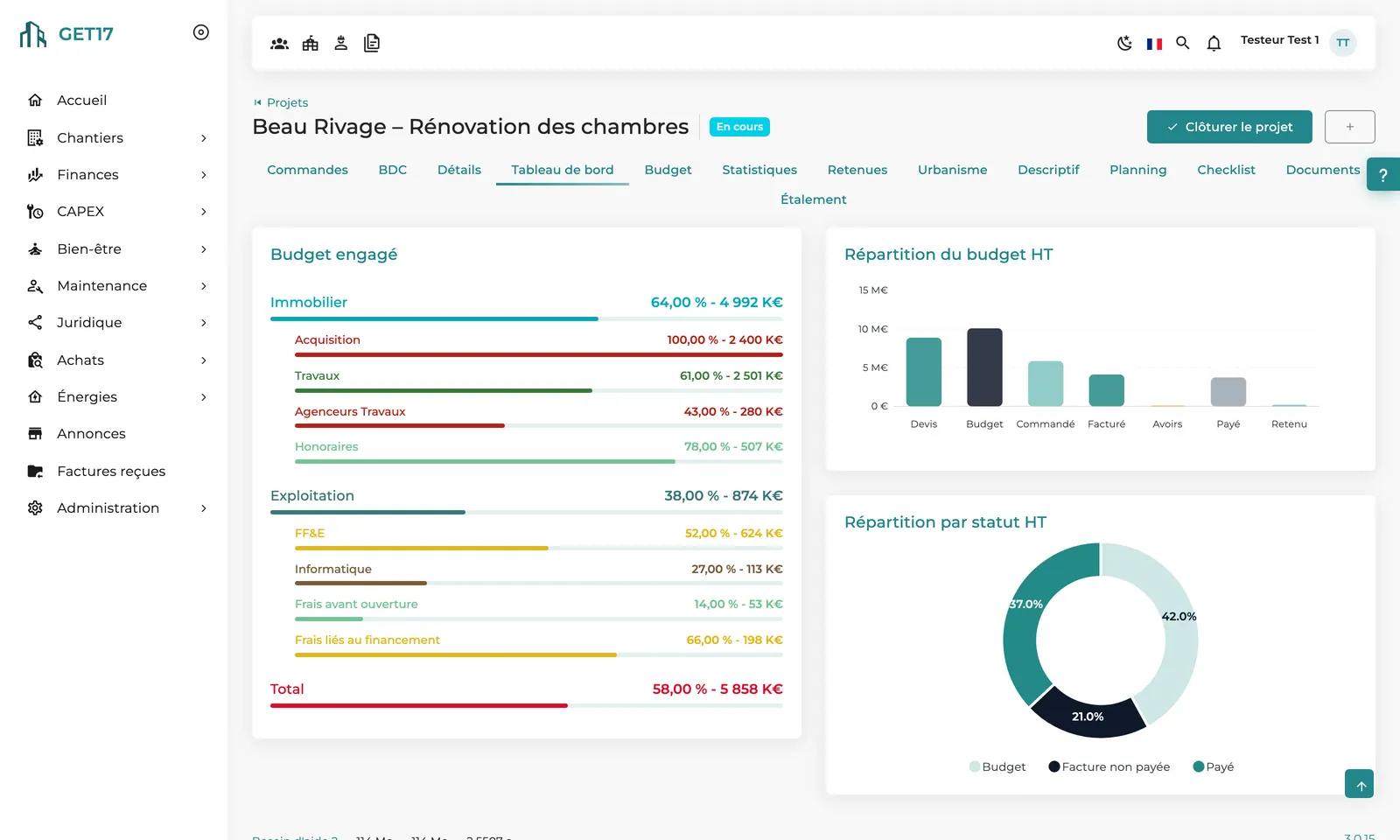
The project dashboard shows commitments by family, what remains to be invoiced and what remains to be paid. Before the change order, you freeze the budget.
Your dashboard
Committed budget by family and category, budget breakdown from quote to paid, breakdown by status: the project's financial progress at a glance.
Frequently asked questions
The site manager, their deputies and procurement assignees are buyers by default. A budget category can restrict ordering to a specific role.
Yes: financial approval threshold, up to three management levels by category and amount, e-signature of the purchase order and contractor countersignature, depending on your setup.
The project's retentions tab consolidates every invoice concerned; an order stays pending release until its retention is settled.
Yes. The planning permission tab lists building permits and prior declarations, with their decisions and official documents.
See how GET17 tracks your budgets, orders and contractors, from the first quote to the final payment.